 UninstallGuard
A careful Mac uninstaller
Remove the appKeep your trust
UninstallGuard finds the files apps leave across your Mac. It explains every result and lets you decide what to trash.
For macOS 14 or later. No subscription.

Nothing moves until you decide
Other uninstallers hand you a list and ask you to trust it. UninstallGuard shows the evidence behind every match, then leaves the final call to you. Whatever you approve moves to the Trash, where you can put it back until you empty it.
Choose an app
Pick it from the sidebar, drop it into the window, or, once enabled, right-click it in Finder
Read the evidence
Each file shows its path, size, confidence, and the exact reason it matched
Choose what leaves
Nothing starts selected. Review the findings, select what makes sense, then confirm
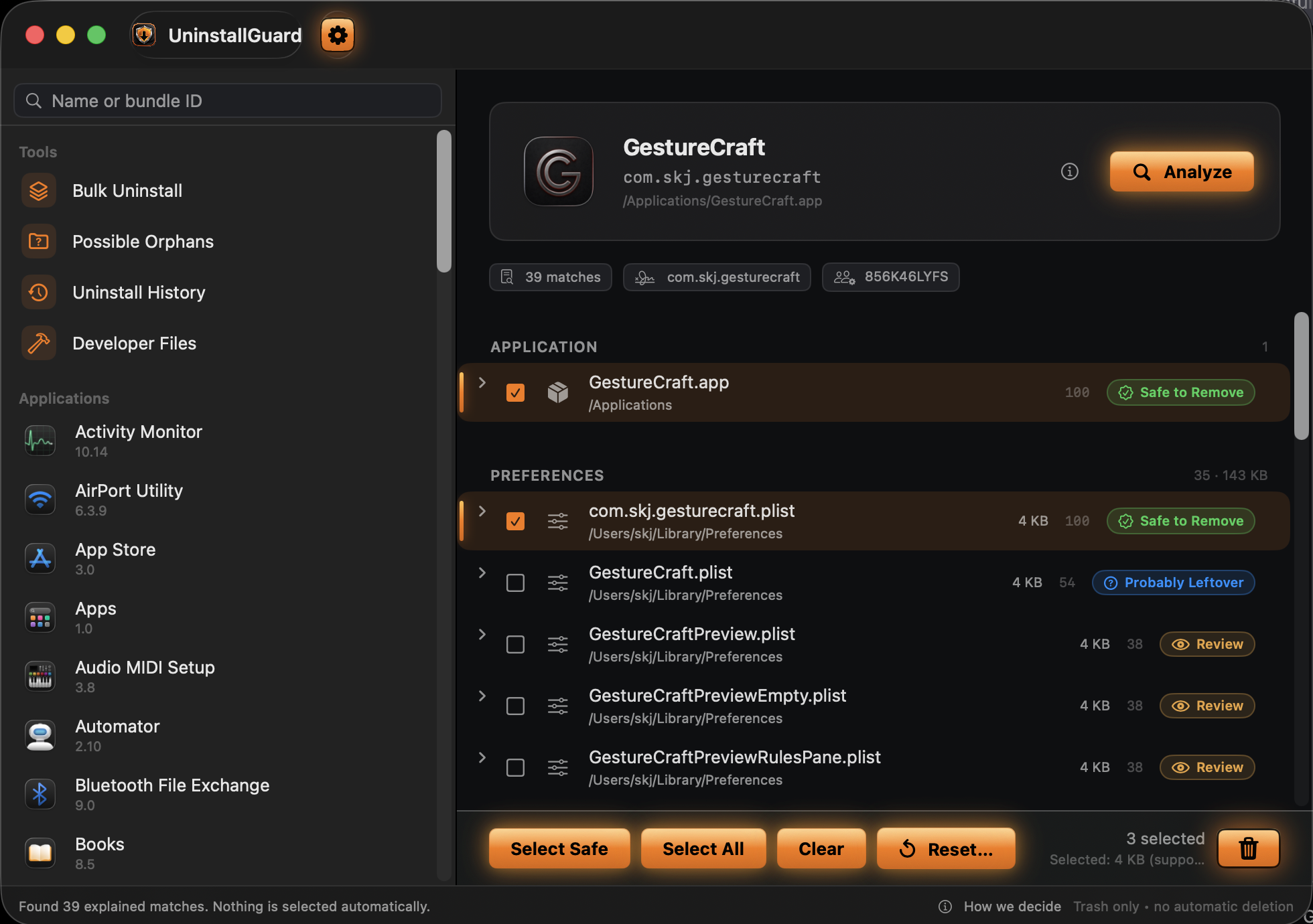
Paths, confidence, and the reason for every match stay in view
It cannot silently decide for you
Nothing is preselected
A scan is information, not permission. Selection always starts empty
Weak matches stay weak
Name-only clues never become “safe” just because a file is old or large
Trash is the destination
UninstallGuard’s own removal flow has no permanent-delete path
There is a record
History keeps original and Trash locations, failures, and the result of the follow-up scan
Four labels. No mystery score
The evidence can be inspected without learning macOS internals. Open any finding to see what matched and why its confidence landed where it did
Exact, app-specific identity in an expected location
Strong ownership evidence that still deserves review
Useful evidence, but not enough for a confident recommendation
The app is running, so removal is blocked
Find leftovers from apps deleted long ago
Possible Orphans scans for app-shaped residue whose owner is no longer installed. It stays conservative: orphan findings are never called safe and never selected automatically. Turn on the weekly leftover check and UninstallGuard looks once a week, even while it is closed, and sends one notification when it finds new ones
Included with UninstallGuardKeep pace with macOSStay careful with removals
Some once-loved uninstallers stopped receiving updates. Others grew into broad utility suites that charge for optimizers, monitors, and extras you did not come to buy. UninstallGuard stays focused and does the complete uninstalling job
An uninstaller that no longer keeps pace with macOS
Built for current macOS releases and active maintenance
Loose filename guesses presented as confident answers
Exact identity evidence, installed-app checks, and a reason for every match
A cleaner bundle packed with tools you never planned to use
App data, helpers, launch items, containers, system extensions, Homebrew installs, orphans, and history
A subscription or another payment when a new version arrives
One purchase includes every future UninstallGuard version
Not a cleaner. Not an optimizer
No utility bundleNo cleanup theaterNo recurring payment
Pay $9.99 once